
Technology
Google surprises Pixel 10 users with new AI powered Pixel Journal app and here is what it can do
Google has launched the Pixel Journal app exclusively for Pixel 10 users, bringing AI powered prompts, insights, and privacy controls that rival Apple’s Journal app.


At its much-anticipated Pixel 10 launch event, Google quietly introduced a brand-new app — the Pixel Journal. The move comes almost two years after Apple unveiled its own Journal app in 2023 alongside iOS 17. With this release, the two tech giants are once again going head-to-head, this time in the growing space of digital journaling.
ALSO READ : China secretly prepares yuan-backed stablecoins as global summit nears and insiders say it could rival the dollar
AI at the core of journaling
The Pixel Journal isn’t just another diary app. Powered by on-device AI models, it actively encourages users to write by offering smart prompts. These prompts may include memories, past entries, or even personal goals, turning routine journaling into a guided and reflective experience.
Users can also enrich their entries by adding photos, locations, and activities, and even log their moods — making it more than just text on a screen.
Personalized insights
Google promises that the Pixel Journal will learn from each user’s writing habits. Over time, it will surface insights like:
- When you usually write your entries.
- Which entry was your longest by word count.
- How many entries you made in a week or month.
This data-driven approach aims to make journaling more engaging, while also giving users a glimpse into their own behavioral patterns.
Privacy first
In an era where personal data is constantly under scrutiny, Google has added a much-needed safeguard: the option to lock the Pixel Journal app. This ensures that private thoughts remain truly private, protected from prying eyes.
Pixel 10 exclusive — for now
Currently, the Pixel Journal is available only to Pixel 10 series owners. However, Google hinted that it may roll out to older Pixel devices in the near future. That said, the exclusivity could be a deliberate move to attract more buyers to the newly launched Pixel 10.
The bigger picture
The launch underlines a subtle but important narrative — Google and Apple’s ongoing rivalry. By launching the Pixel Journal, Google has not only matched Apple’s offering but also added its own AI-powered twist.
Digital journaling is no longer just about writing memories. With AI insights, multimedia entries, and privacy controls, Google is betting big on making journaling a daily habit for millions.
For Pixel 10 users, this might just be another reason to celebrate — and for Apple, perhaps another reason to watch its back.











games
Crimson Desert on PS5 Pro Looks “Unbelievably Real”… But Is It Finally the Console Breakthrough Gamers Were Waiting For?
With jaw-dropping visuals, ray tracing across all modes, and near-PC performance, Pearl Abyss’ ambitious open-world epic may redefine what consoles can truly deliver.


When a next-gen game promises to blur the line between console and PC, skepticism usually follows. But after more than 25 minutes of near-final gameplay footage, Crimson Desert on the PlayStation 5 Pro is doing something rare — it’s turning doubters into believers.
Developed by Pearl Abyss, the studio behind the popular MMORPG Black Desert Online, this new title isn’t just another open-world adventure. It’s a technological showcase powered by the studio’s in-house BlackSpace Engine, and it’s already being hailed as a potential game-changer.
A World That Feels Alive — Down to Every Brick
Unlike many modern titles relying heavily on Unreal Engine 5, Crimson Desert takes a different path. The result? A world packed with astonishing detail — from sweeping landscapes to microscopic textures that make every stone, wall, and surface feel tangible.
The secret sauce lies in advanced rendering techniques like ray-traced global illumination. In simple terms, light behaves as it does in the real world — bouncing off surfaces, filling interiors naturally, and reacting dynamically to the environment. Whether it’s sunlight pouring through a window or a lantern casting shadows in a dark cave, the effect is strikingly realistic.
And yes, this isn’t limited to high-end PCs anymore.

PS5 Pro Performance: Three Modes, One Big Question
The big question for console gamers has always been: Can it actually run well?
Here’s where things get interesting. On the PlayStation 5 Pro, Crimson Desert offers three distinct modes:
- Performance Mode (60fps target)
- Balanced Mode (40fps target)
- Quality Mode (30fps target)
What stands out is that ray tracing is enabled across all three modes — a rare move that ensures consistent lighting quality no matter how you choose to play.
Even more impressive is the base resolution strategy. Instead of dipping too low (a common issue this generation), the game targets:
- 1080p (Performance)
- 1440p (Balanced)
- 4K (Quality)
These are then upscaled using PlayStation’s PSSR technology. While the current build uses an early version of this upscaling method, future improvements could significantly enhance clarity and stability.
Where It Still Struggles… Just a Little
Let’s be clear — this isn’t a flawless experience yet.
Performance mode, aiming for 60fps, occasionally dips during intense moments with many on-screen elements. This is likely due to CPU limitations, something even modern consoles still grapple with compared to high-end PCs.
There’s also a minor issue with VRR (Variable Refresh Rate). While the feature is supported, the absence of proper low frame-rate compensation can lead to occasional screen tearing when performance dips below certain thresholds.
Still, these aren’t deal-breakers — more like final polish points before launch.

Console vs PC: Has the Gap Finally Closed?
For years, PC has been the gold standard for visual fidelity and performance. But Crimson Desert on PS5 Pro suggests that gap is shrinking — fast.
From massive open-world scale to intricate environmental detail, the console version holds remarkably close to what we’ve seen on PC builds. That’s no small achievement, especially for a game this ambitious.
And while we’re still waiting to see how it performs on base PS5 or other platforms, one thing is already clear: PS5 Pro owners are in for something special.
Why This Game Matters More Than You Think
This isn’t just about one game looking good. It’s about what it represents.
If Crimson Desert delivers on its promise at launch, it could signal a shift in how developers approach console optimization — proving that with the right engine and design philosophy, consoles can handle experiences once thought exclusive to PCs.
In an era where many titles struggle with performance compromises, this feels like a bold step forward.
For More Update- DAILY GLOBAL DIARY
Automobile
“Is This Tesla’s Next Headache?”: Rivian R2 Targets Model Y With More Power, Longer Range… and a Surprisingly Lower Price
The upcoming Rivian R2 electric SUV promises 656 horsepower, up to 345 miles of range, and adventure-ready design—aiming straight at Tesla’s Model Y dominance.
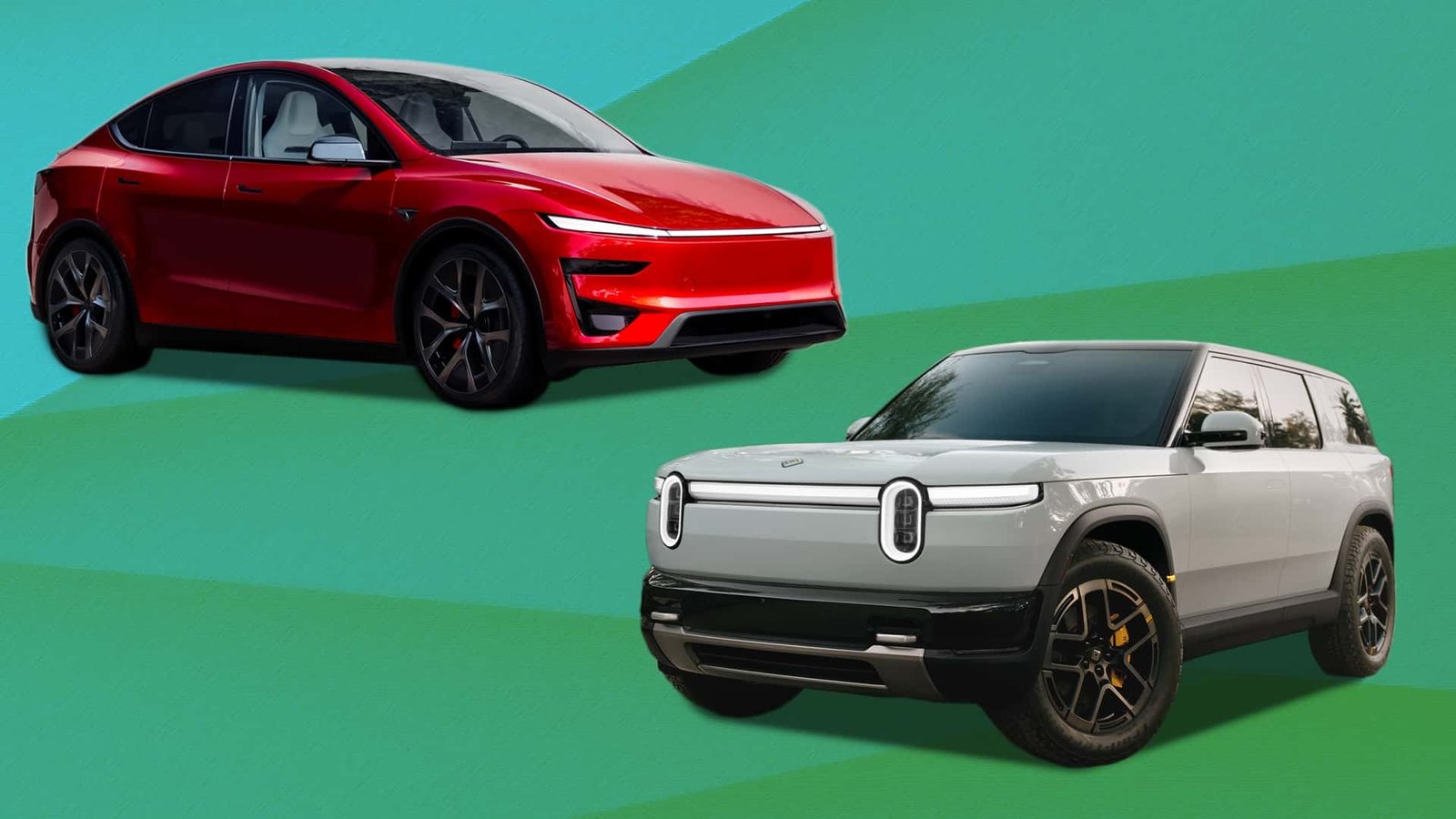
For years, the electric SUV segment has largely been defined by one vehicle: the Tesla Model Y. But a new challenger is preparing to enter the ring—and it’s coming from one of the most intriguing EV startups in America.
Meet the Rivian R2, the compact electric SUV from Rivian that could soon become the brand’s biggest seller yet. Early hands-on impressions from the company’s design studio suggest the R2 may combine performance, range, and price in a way that finally puts real pressure on Tesla’s best-selling EV.
Rivian’s Strategy: Smaller, Cheaper, and Mass Market
Unlike the premium Rivian R1T and Rivian R1S, the new R2 is designed to reach a much wider audience.
The first version launching in spring 2026 will be the high-performance trim priced at $59,485. However, Rivian plans to introduce more affordable versions over time. By 2027, entry-level models could start at around $45,000, making the R2 significantly more accessible than Rivian’s earlier vehicles.
The timing isn’t accidental. The compact SUV category—dominated by models like the Honda CR-V and Toyota RAV4—is one of the largest segments in the global auto market.
And Rivian wants a piece of it.

A Familiar Design With an Adventurous Twist
The R2 was developed at Rivian’s design studio in Irvine, California, where the company’s chief design officer Jeff Hammoud confirmed that the SUV intentionally borrows styling cues from its larger sibling.
The result is what many inside the company call a “mini-me” version of the R1S.
Signature Rivian design elements remain intact, including the brand’s distinctive vertical headlights and bold rear lighting strip. However, the R2 introduces subtle aerodynamic tweaks—such as a tapered roofline and specially shaped wheels—to improve efficiency and extend range.
The proportions also place the R2 squarely in the compact SUV category, with dimensions similar to the Tesla Model Y but smaller than rugged SUVs like the Toyota 4Runner.
Inside the Cabin: Premium Feel Without the Premium Price
Step inside the R2 and the focus immediately shifts to technology and materials.
Two large horizontal displays dominate the dashboard, delivering navigation, entertainment, and vehicle controls. Rivian continues to develop its own infotainment ecosystem—similar to Tesla—which means no Apple CarPlay or Android Auto support.
However, built-in navigation powered by Google and apps like Spotify are included.
The interior materials are another highlight. Rivian combines wood accents, durable fabric, and vegan leather to create a cabin that feels upscale even in lower trims.
Interestingly, designers also addressed a common complaint about earlier Rivian vehicles: storage.
The R2 adds two gloveboxes, large door pockets, sliding trays, and additional cargo space. The vehicle even retains Rivian’s signature removable flashlight built into the door—a quirky but practical feature that has become something of a brand trademark.
Surprisingly Spacious for a Compact SUV
Despite its smaller footprint, the R2 offers generous interior space.
Rear passengers benefit from ample legroom and headroom, while the cargo area includes:
- A traditional trunk
- Hidden underfloor storage
- A frunk (front trunk) large enough for travel bags
The rear seats also fold completely flat in a 40/20/40 configuration, allowing Rivian to offer a unique optional accessory: a mattress designed for sleeping inside the vehicle.
Yes—Rivian clearly expects some R2 owners to take it camping.
Performance That Rivals Tesla
Performance is another area where the R2 aims to impress.
The launch version will feature dual motors, all-wheel drive, and 656 horsepower, allowing the SUV to accelerate from 0–60 mph in just 3.6 seconds.
That puts it right in the same performance territory as the Tesla Model Y Performance variant.
Even more impressive is the estimated range.
The R2 Performance is expected to deliver around 330 miles per charge, while a future single-motor version could reach 345 miles.
If those numbers hold up in real-world testing, the R2 would rank among the longest-range electric SUVs in its class.

Charging and Towing Advantages
Every R2 will include the North American Charging Standard, meaning owners can use the extensive Tesla Supercharger network across North America.
Rivian also made a clever design choice by placing the charging port in the same location used by Tesla vehicles—making charging stations easier to access.
The R2 isn’t just about efficiency either. It’s also surprisingly capable.
With the optional tow package, the SUV can pull up to 4,400 pounds, beating the Model Y’s towing capacity of 3,500 pounds.
The Big Question: Can Rivian Pull It Off?
The EV industry is currently facing slower sales growth in the United States, and Rivian itself has dealt with financial challenges.
Yet the company still carries a strong “cool factor” among EV enthusiasts.
And with a smaller size, lower price, and adventure-focused personality, the R2 may finally give Rivian the product it needs to reach mainstream buyers.
If everything goes according to plan, the R2 won’t just compete with Tesla—it might become the most important vehicle Rivian has ever built.
For More Update – DAILY GLOBAL DIARY
Technology
MasterClass Slashes Prices by 50% Ahead of Holidays — Learn From Martin Scorsese, Gordon Ramsay and Kim Kardashian for Less Than Ever…
From Hollywood legends to business icons, MasterClass rolls out a rare half-off deal just in time for last-minute holiday gifting.

If you’re still searching for a meaningful last-minute holiday gift — or planning to invest in yourself before the new year — MasterClass has just made the decision a lot easier.
The celebrity-led online learning platform is currently offering 50 percent off its annual membership, matching its much-anticipated Black Friday pricing. The limited-time holiday sale runs from December 16 through December 24, making it one of the strongest deals of the year for curious minds and lifelong learners.
At the center of the offer is the MasterClass Plus plan, now discounted to $90 per year, unlocking access to more than 200 premium video courses taught by some of the most recognizable names in entertainment, sports, food, science, and business.
A Classroom Led by Icons, Not Textbooks
What sets MasterClass apart isn’t just the production quality — it’s the instructors.
Subscribers can learn filmmaking from legendary director Martin Scorsese, storytelling from hitmakers like Shonda Rhimes, and cinematic tension from Spike Lee. Fans of pop culture television can dive into creative collaboration with The Duffer Brothers, the minds behind Stranger Things.
ALSO READ : Taylor Swift Quietly Changes Lyrics to Two Reputation Songs on Apple Music, Swifties Go Into Detective Mode
The platform also reaches far beyond Hollywood.
Science enthusiasts can explore the universe with astrophysicist Neil deGrasse Tyson, while motorsport fans can learn focus and performance from seven-time Formula One world champion Lewis Hamilton.
And for those who believe creativity begins in the kitchen, culinary legends like Gordon Ramsay and lifestyle icon Martha Stewart offer master-level instruction on food, hospitality, and home excellence.
Kim Kardashian Enters the Classroom
One of the most talked-about additions this month comes from entrepreneur and media powerhouse Kim Kardashian, who recently launched her first-ever business course on the platform.
Titled “The New Rules of Business: The Ten Kimmandments,” the class pulls back the curtain on personal branding, deal-making, and building a billion-dollar empire in the modern attention economy — making it especially appealing to young founders and creators.
New classes like this are added regularly, ensuring the platform evolves alongside cultural and professional trends.

Learning on Your Time, Your Terms
Beyond star power, MasterClass continues to refine its user experience. Lessons are designed to be watched on-demand, allowing users to start, pause, or revisit sessions whenever they like. The platform also now supports offline downloads, making it easier to learn during travel or commutes.
The Plus plan adds another layer of convenience, allowing two users to stream simultaneously, making it ideal for couples, families, or shared gifting.
In an age where attention is fragmented and learning often feels transactional, MasterClass positions itself as something different — immersive, thoughtful, and aspirational.
Why This Holiday Deal Stands Out
While online education platforms are everywhere, few combine storytelling, credibility, and inspiration the way MasterClass does. The holiday discount brings the annual cost down to a level that rivals a single workshop or textbook — but with access to hundreds of lessons taught by the very people who shaped their industries.
For anyone looking to gift skills instead of stuff, this limited-time sale offers rare value — and a compelling way to start the new year learning from the best.

Russell T Davies Says ‘You’re Queer in 2026, You’re a Political Act’ — and His New Show ‘Tip Toe’ Is His Most Furious, Personal Work Yet…

Netflix’s Ted Sarandos Turns to Europe After Warner Deal Collapse… and Sends a Subtle Message to Regulators

The Writers of ‘Paradise’ Debated Hard Before Giving You That Jaw-Dropping Moment Early — Here’s Why They Finally Said ‘Do It…’

Rajasthan Royals Sold for Record $1.63 Billion — IPL’s First $1 Billion Franchise, Meet New Owner Kal Somani

Spencer Johnson Ditches PSL, Joins CSK for IPL 2026 — PCB Threatens Legal Action as Player Exodus Continues

1-Iran Issues Dire Warning to Israel and Defies Trump on Nukes: “We’re Ready to Strike Deep Inside”

Donald Trump’s net worth reveals the fortune behind the former US President and business mogul

“She Never Made It Out…” Albany House Fire Claims Woman’s Life as Family Pleads for Help to Bring Her Home

Caitlin Clark Sidelined with Quad Strain, Set to Miss Two Weeks of WNBA Action

“Tomás Rodríguez Net Worth 2025: Panama’s Gold Cup Goal‑Machine’s Surprising Fortune Revealed”

Miss Jamaica Suffers Terrifying Fall Off Miss Universe Stage; Rushed to Hospital on Stretcher in Viral Video

Moana Live-Action Teaser Sparks Outrage as Fans Call Disney’s Move a ‘Clear Money Grab’ — What Went Wrong?

Ryan Gosling’s Project Hail Mary Trailer Stuns Fans with a Mysterious Alien Ally and a Mission That Could Save Earth

Apple delays Jessica Chastain thriller The Savant about domestic extremism after recent US violence

Avatar 3, Fire and Ash trailer reveals Jake Sully’s family facing terrifying new Na’vi enemies with deadly fire powers
-

 Entertainment5 days ago
Cannes 2026 Hasn’t Announced a Single Film Yet — But the Whisper Network Is Already Pointing to These Names and It’s Exciting…
-

 Entertainment6 days ago
Amy Poehler and Sterlin Harjo Are Getting One of Television’s Highest Honours — and the Reason Why Says Everything About Where Storytelling Is Headed…
-

 Entertainment1 week ago
Oscars 2026 Red Carpet Shockers: Zendaya’s Late Arrival, Jessie Buckley’s Grace Kelly Tribute… and Chase Infiniti Owning the Night
-

 Politics1 week ago
“Trump Reveals ‘Early Stage Breast Cancer’ Diagnosis of Susie Wiles… But Says Her ‘Strength Says Everything’”
-

 Entertainment5 days ago
Almodóvar, Lars von Trier, Joel Coen and More — The Films That Could Own Cannes 2026 Are Already Generating Serious Buzz and the List Is…
-

 Entertainment1 week ago
The Oscars Are Already Being Called Before They Happen and Scott’s Final Feinberg Forecast Reveals a Shocking Front-Runner That Nobody Saw Coming…
-

 Entertainment5 days ago
Lollapalooza 2026 Just Dropped Its Most Surprising Lineup Yet — and the One Historic Thing Nobody Is Talking About Is the Real Story…
-

 Health1 week ago
“Kent Meningitis Tragedy: Second Student Dies as Outbreak Sparks Hospital Emergency…”